

Understanding Our Users: Mapping, Interviews, and Surveys
To better understand our target users and their needs, we followed a systematic approach that involved mapping, interviews, and surveys. Here's a breakdown of our process:
Mapping User Characteristics
- We began by mapping out and discussing internally who our users might be.
- This exercise helped us gain initial insights into the demographics and characteristics of our target audience.
Proto-Persona Development
- Building upon our assumptions, we created a Proto-Persona representing a fictional but representative user based on our mapping exercise.
- This Proto-Persona served as a starting point for further research and understanding.
Interview Plan and Survey Outlines
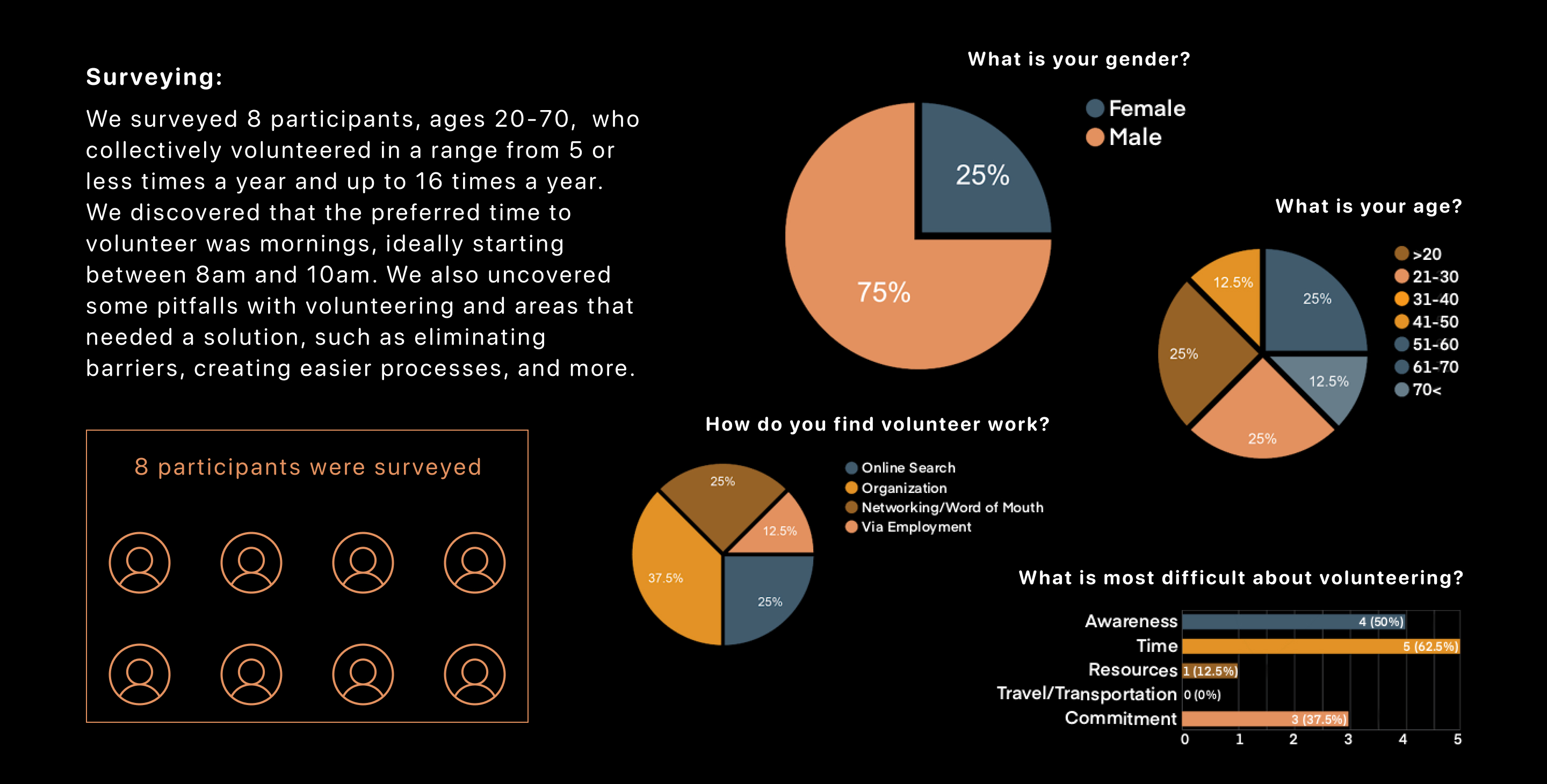
- With our Proto-Persona in mind, we developed an interview plan and survey outlines for volunteers and organizations.
- These research tools provided a structured framework to gather specific insights from our target users.
Reaching Out to Organizations and Volunteers
- We proactively contacted several organizations and volunteers to participate in our research.
- The SELAH Neighborhood Homeless Coalition and Phoenix Rescue Mission were two key organizations that provided valuable information.
- These organizations offered valuable perspectives from the organizational point of view, shedding light on their needs and challenges.
Volunteer Interviews
- In addition to organizational insights, we interviewed five volunteers who generously shared their experiences.
- The interview questions were carefully structured to capture details about their volunteering experiences, including frequency, obstacles, and overall satisfaction.
- These interviews allowed us to gain a deeper understanding of our target users and their motivations.
User Persona Development
User Persona Creation
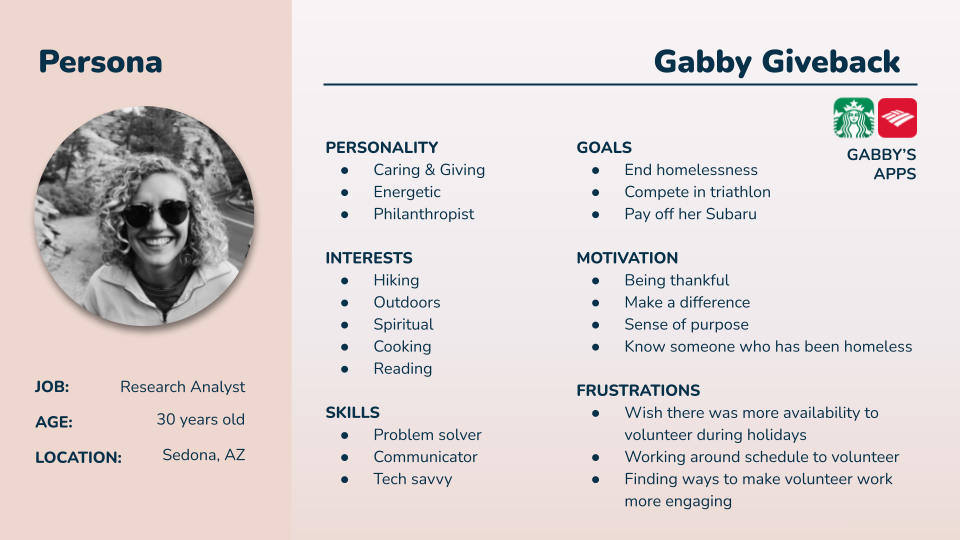
- We synthesized the collected information through the interviews and research to create a User Persona.
- The User Persona represented a fictional character that embodied our target users' key traits, goals, and pain points.
- This User Persona served as a guiding reference throughout the design process, ensuring that we kept our users' needs at the forefront.
Following this comprehensive research process, including mapping, interviews, and surveys, we gained valuable insights into our target users' characteristics, experiences, and challenges. The resulting User Persona became a valuable tool for us to make informed design decisions and tailor our solution to meet the specific needs of our users.
“Please describe your most profound volunteer experience.”
“I think it was really just seeing the people being thankful for having a warm meal to eat. Also, some of them that are just, like... they're not there alone”
Synthesizing User Data and Design Exploration
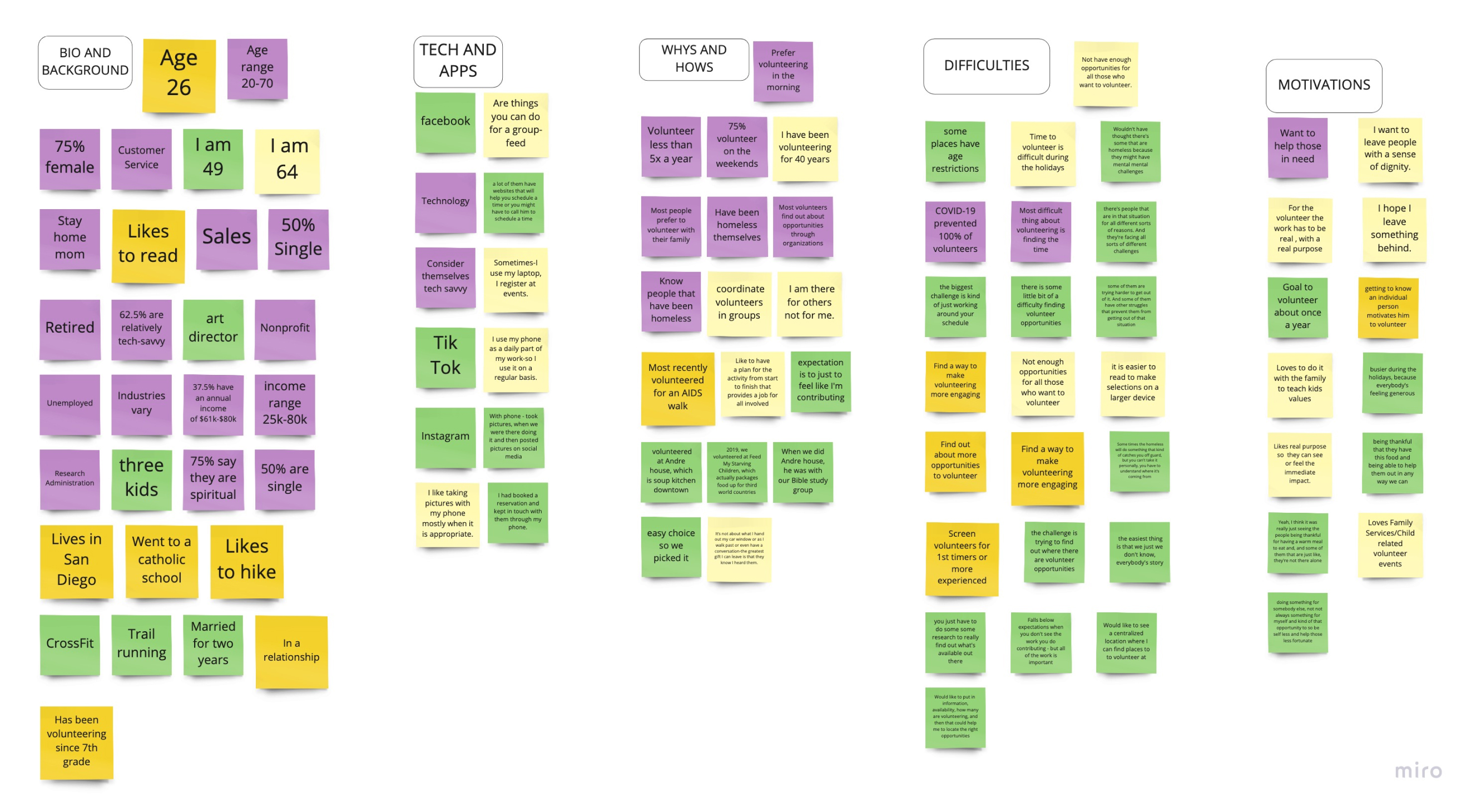
We utilized an affinity diagram to make sense of the data we collected from the user interviews and identify common themes and patterns. Here's an overview of our process:
Affinity Diagram
- We synthesized the data from the user interviews, categorizing and grouping similar insights and observations.
- The affinity diagram visually represented the connections and relationships between the collected data, highlighting commonalities among the interviewees.
Identifying Key Issues and Design Considerations
Time Constraints and Volunteer Awareness
- Our interviews revealed that many users faced challenges finding time to volunteer or were unaware of available volunteer opportunities, particularly outside of the holiday season.
- This insight became a significant focal point for addressing user needs in our design solution.
Design Exploration
Storyboard
-To further explore and communicate potential user experiences, we created a storyboard.
- The storyboard visually depicted a narrative, illustrating how users might interact with our solution in their volunteer journey.
Empathy Map:
- We developed an empathy map to gain a deeper understanding of users' emotions, thoughts, and behaviors related to volunteering.
- This tool helped us empathize with users and uncover insights that informed our design decisions.
User Journey Map
- Creating a user journey map allowed us to map out the different stages and touchpoints of a user's volunteering experience.
- This visualization helped us identify pain points, opportunities for improvement, and areas where our solution could add value.
User Scenario
- We crafted a user scenario that described a specific situation or task users might encounter during their volunteering journey.
- This scenario enabled us to envision the context in which our solution would be utilized and consider user interactions and expectations.
User Flow
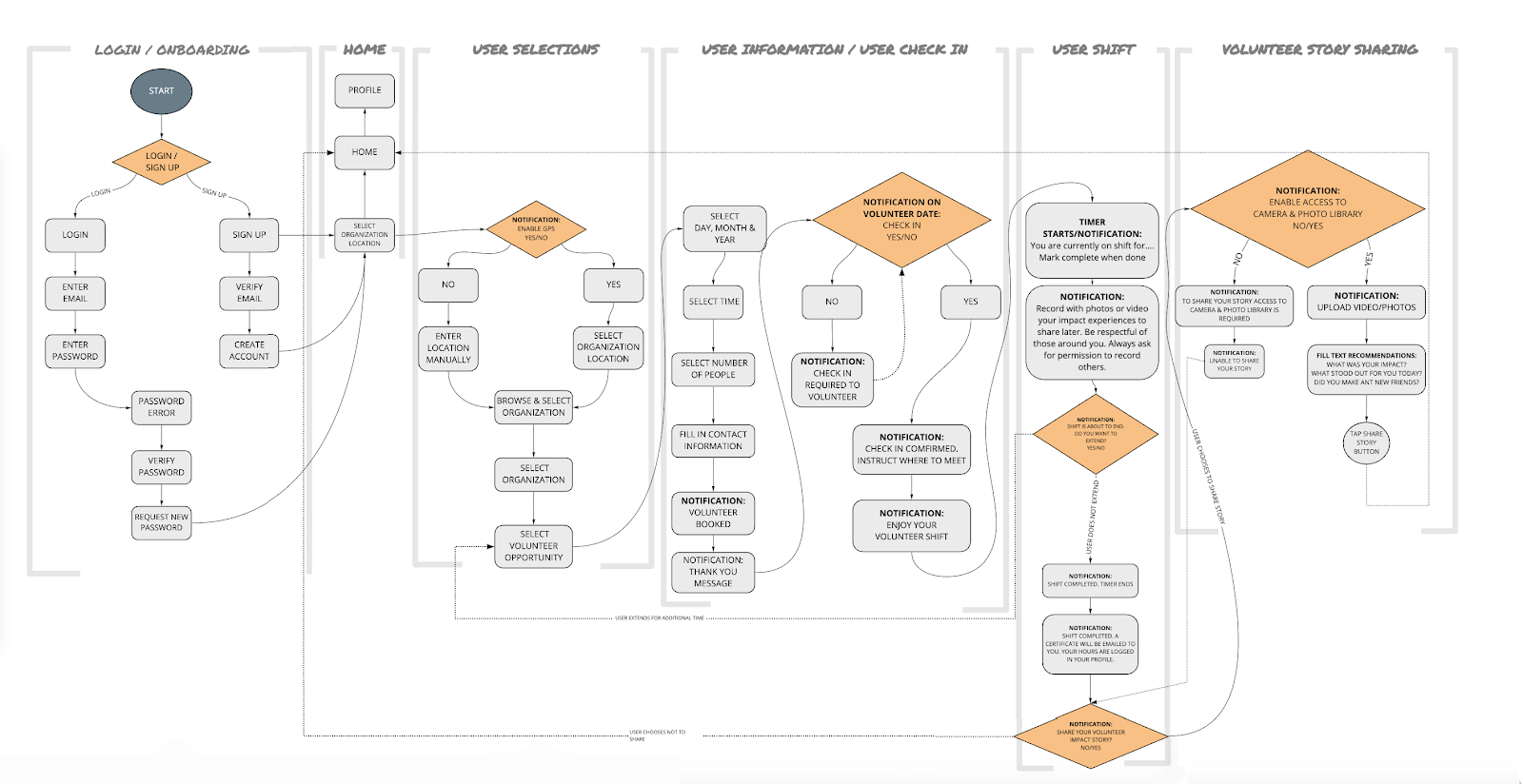
- We developed a user flow diagram to map out our solution's step-by-step interactions and navigation.
- This visual representation helped us ensure a seamless and intuitive user experience.
We identified common issues, such as time constraints and lack of volunteer awareness, by synthesizing the user interview data through an affinity diagram. These insights guided our design exploration, including creating a storyboard, empathy map, user journey map, user scenario, and user flow. This comprehensive approach allowed us to understand user perspectives, address key challenges, and develop a solution catering to their needs.
Prototyping User Flows and Wireframes
When we reached a point of confidence with our user flows, we entered the prototyping phase. Here's an overview of our process:
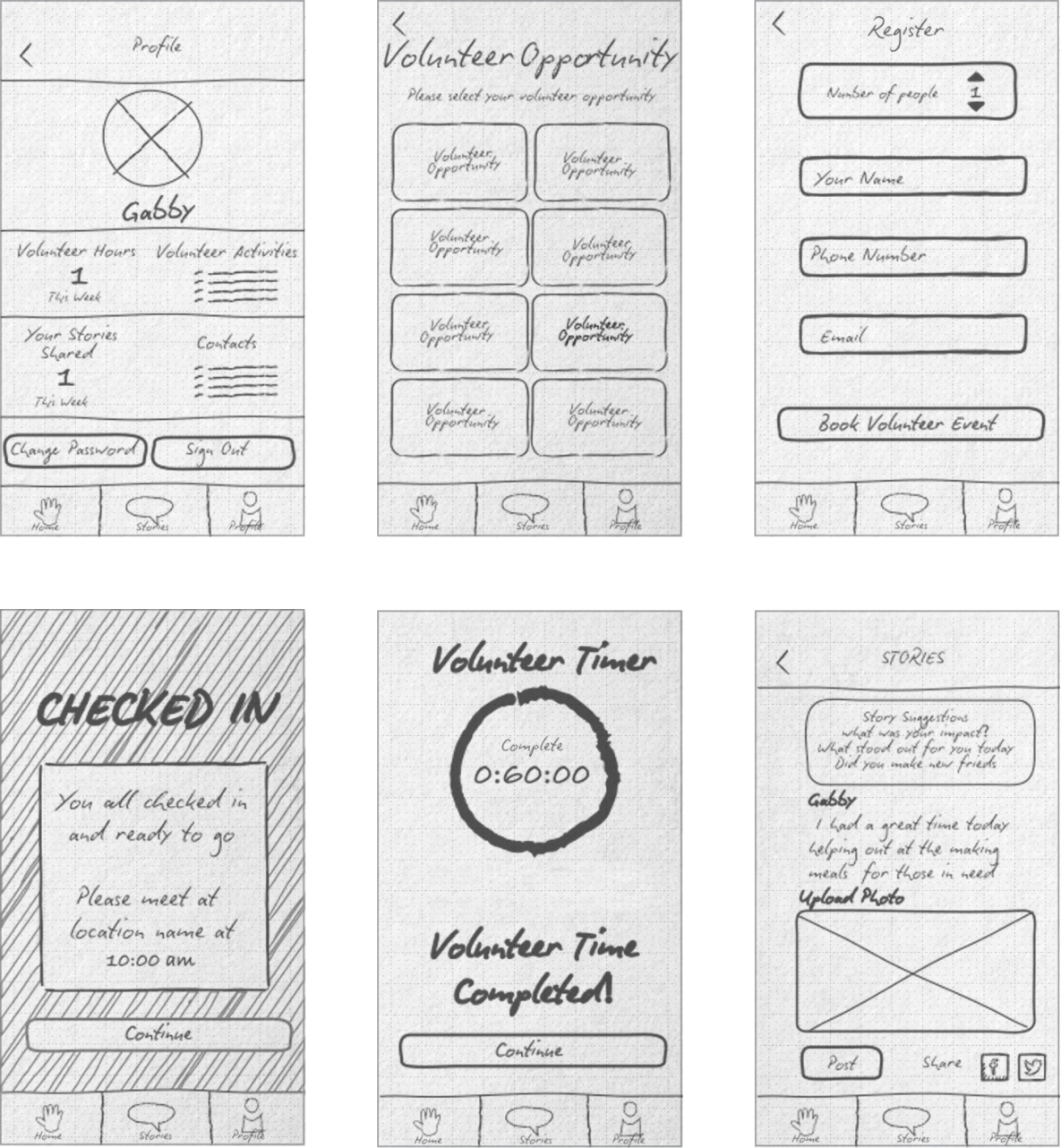
Hand Sketching Wireframes
- Each team member took part in sketching wireframes that represented their interpretation of the user flows in app form.
- Through hand sketching, we quickly translated our ideas into visual representations.
Clickable Wireframes and Comparison
- To gauge the effectiveness of our wireframes, we transformed our hand-drawn sketches into clickable prototypes.
- These clickable wireframes allowed us to simulate the user experience and compare different versions.
Drawing Comparisons and Identifying Similarities
- By comparing the wireframe sketches, we could draw comparisons and identify similarities in design elements, interactions, and overall user experience.
- This process helped us quickly recognize patterns, align our understanding, and make informed decisions.
Strategy Revision
- We revised our design strategy based on the comparisons and insights gathered from the clickable wireframes.
-We capitalized on the strengths and positive aspects identified during the comparison process, refining our direction accordingly.
Digitizing Wireframes
- Once we were satisfied with the direction of our wireframes, we began digitizing them using design software.
- This digitization process allowed us to create more detailed and polished wireframe representations.
Testing Different Wireframe Versions
Testing Sketch Wireframes
- Initially, we tested the sketch wireframes to gather early feedback and validate the basic concepts and layout.
- This helped us identify any significant usability issues and make necessary adjustments before moving forward.
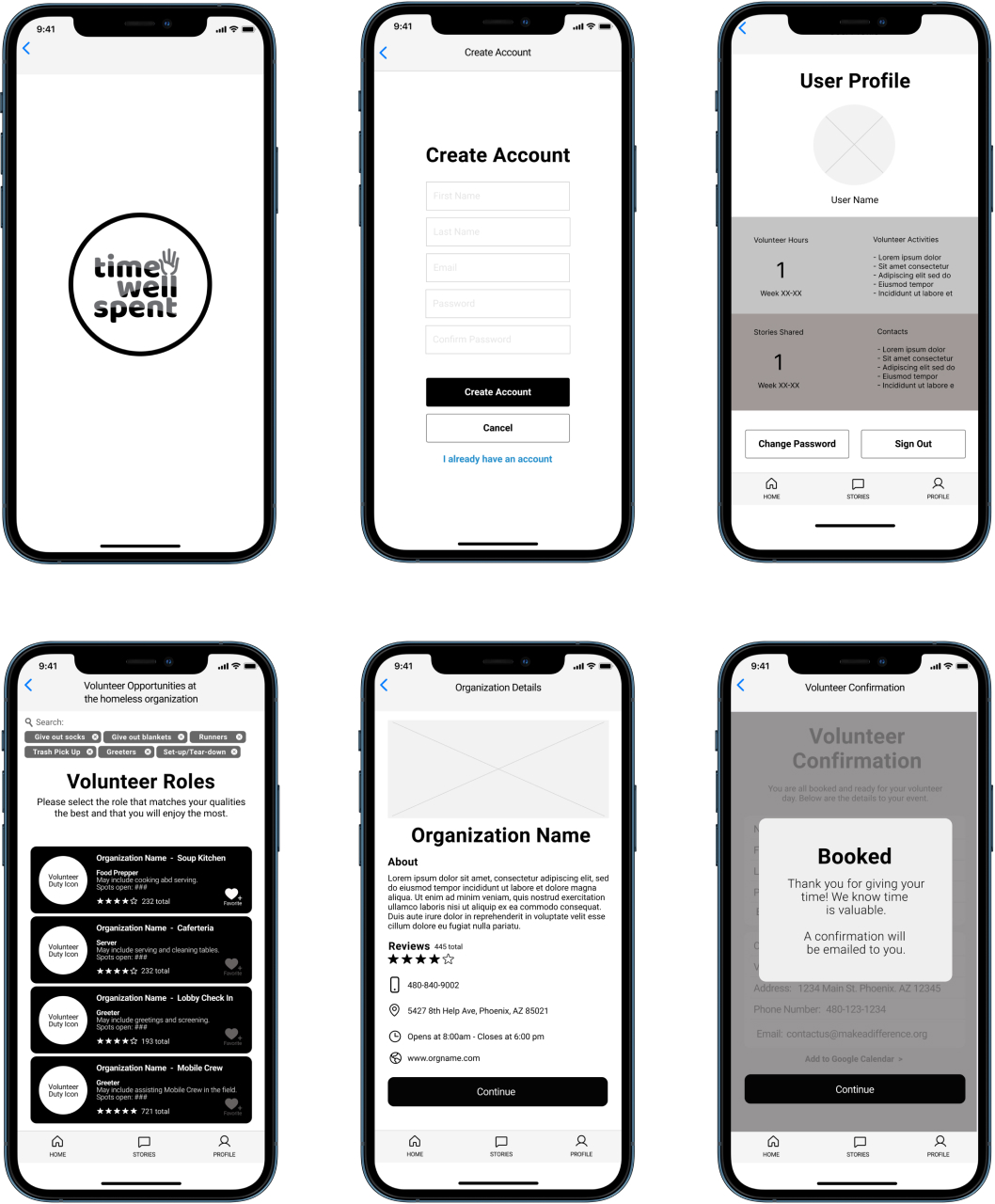
Low-Fidelity Wireframe Testing
- We created low-fidelity wireframes based on the sketch wireframes and tested them with users.
- This testing aimed to evaluate the overall usability, navigation, and information hierarchy of the wireframes.
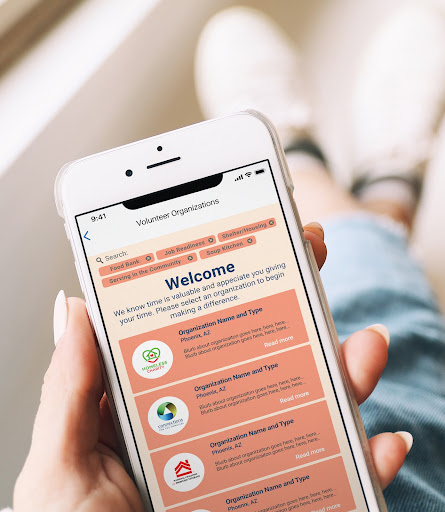
High-Fidelity Wireframe Testing
- Once we refined the low-fidelity wireframes, we developed high-fidelity wireframes with more detailed visuals and interactions.
- The high-fidelity wireframes were tested to validate the visual aesthetics, interactive elements, and overall user experience.
Following this iterative prototyping approach, starting with hand sketching wireframes and progressing to clickable, low-fidelity, and high-fidelity versions, we could refine our design based on user feedback and observations. In addition, the mix of descriptive text and bullet points provides a clear understanding of the prototyping process, from initial sketches to digitization and comprehensive testing.
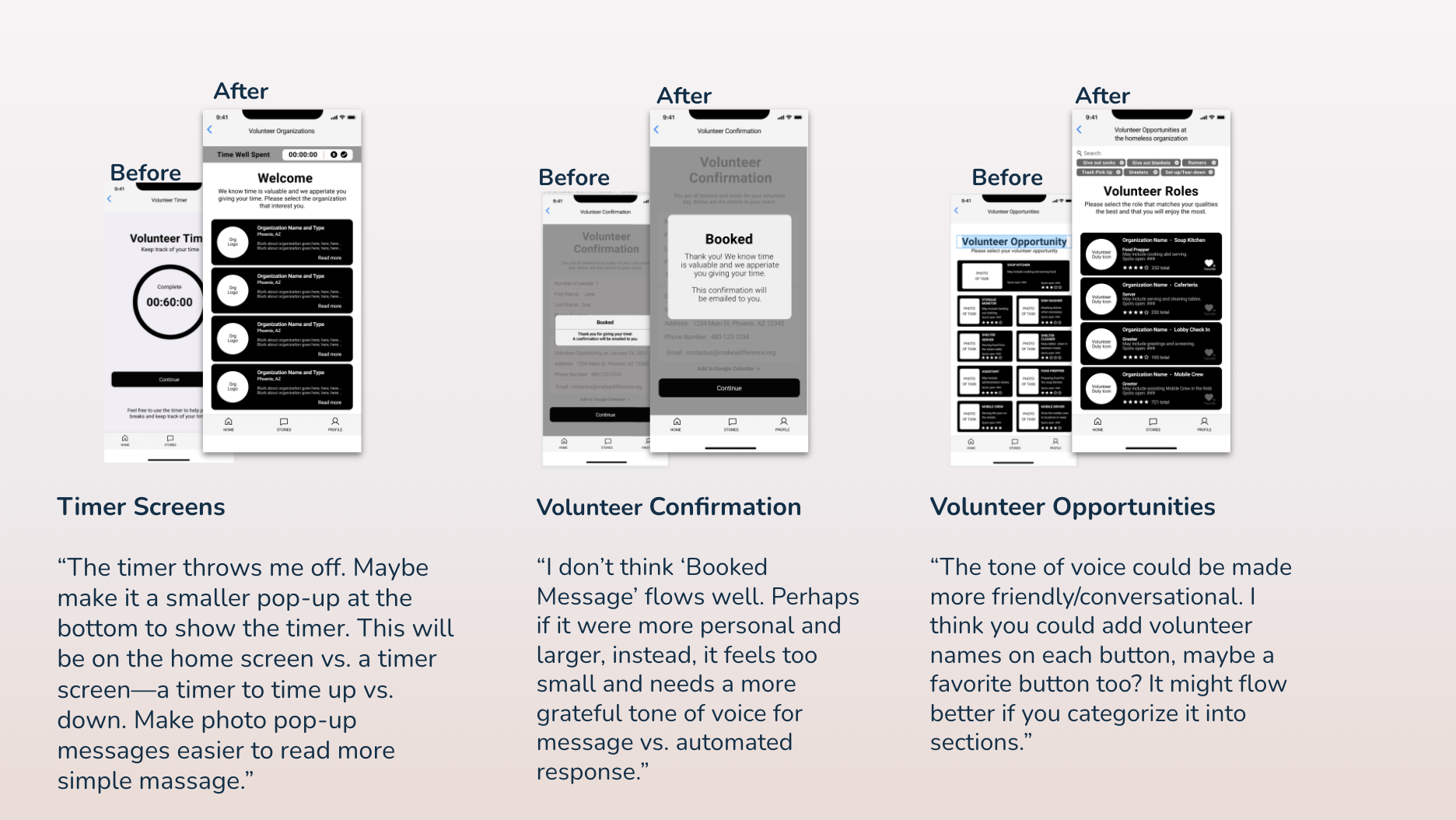
We recruited five user testers to help us with this step. We received a lot of really excellent user feedback from our test group, and they pointed out a few sticky points and places where the logic jumps needed a little more finesse or revamping.
Examples of test users' feedback:
If you like what you see and want to work together, get in touch!
Schedule Chat


